Reader Mail & Rumor Report-August 26, 2005:
In today's reader mail & rumor report we note the release of Logic & Logic Pro.
Logic & Logic Pro:
Logic & Logic Pro have both been released.
A description:
Babya Logic 2006 is an innovative and powerful suite of pro-quality audio production software suite, which includes Babya Logic, a 8-track MIDI sequencer -that enables users to create and score their own music using a variety of pro-quality applications and also includes Babya Jam Pack: Studio Tools, Babya MicroKit and UltraSynth.
Babya Logic 2006 is suitable for composing, scoring and producing music and soundtracks.
Babya Logic is comprised of the following applications:
Babya Logic: A 8-track MIDI sequencer Draw ModeThis mode allows you to place and erase notes. To place a note, move the cursor to where you’d like the note to start and press and hold the left mouse button. Then drag the cursor to the right to the desired note length (each column represents 1/16 note). Once you release the mouse button the note will be placed. To erase a note, move the cursor to the column where your note is and click the right mouse button. To see what instrument a note is, move the cursor to the column where the note is. The instrument number and name will be displayed above the music area on the left side.
Start / Insert Position Mode
Clicking on the music area in this mode places the red column. This determines what part the song will start playing from when you press the play button. Also this is the position where notes will be added or erased when you use the Paste and Insert Space functions. You can also place the red column by clicking on the black bar above the music area while in any mode.
Select Area Mode
This mode allows you to isolate a specific area for editing. The selected area will be highlighted in blue. Click with the left mouse button and drag to the right to select an area. After an area is selected you can extend it by clicking to the right of the selected area. If you click to the left of the selected area, you will deselect the previously selected area and start a new selection. Clicking anywhere in the music area with the right button while in this mode will deselect everything.
Copy Selection
If there is an area currently selected (highlighted in blue), this function will copy that area into memory.
Cut Selection
This will cut out the selected area and copy it into memory.
Paste (Overwrite)
This function will paste from memory to the music area starting at the red column’s position and overwrite the notes that were there previously.
Paste (Insert)
This will insert a space the size of the area to be pasted before pasting it and will not overwrite any notes.
Insert Space
You can insert one blank column at the red column’s position with this button.
Return to Start
This returns the red column and the screen’s position to the beginning of the song.
Play
This plays the song starting from the red column. The song automatically stops when it reaches the last note.
Stop
Click this button to stop the song while it is playing.
Tempo
This sets the tempo, or beats per minute, that the song is played at. For example, the default of 120 plays 120 quarter notes per minute, or 2 quarter notes per second. The range for Tempo is 20-300.
Instruments
Select from 128 melodic instruments (0-127) and 47 percussive instruments (128-174). Selecting an instrument will change the current instrument for the currently selected track. Next time a note is placed it will be in the newly chosen instrument. If there is a selected area (blue highlight), all notes in that area on the current track will be changed to the new instrument. Percussive instruments (128 – 174) do not change tone so it doesn’t matter what row you place them on.
Edit Track
Use these buttons to select which track you want to edit. You can only place notes on one track at a time. The notes of the currently selected track will be in front of all other notes and appear darker. All other tracks will be dimmed. You cannot edit a track that is hidden.
Hide Tracks
Use these buttons to hide up to seven tracks. When a track is hidden it will not be visible on the screen and cannot be altered in any way. This is useful if you, for example, want to copy the baseline of a song but not the melody. You can temporarily hide all tracks but the baseline, copy and paste it, then unhide all tracks. You cannot hide the track that is currently selected for editing.
Transpose
If you’d like your song to be in a higher or lower key, use the Transpose function. Clicking once will raise or lower every note one semitone. If you have an area selected in blue only those notes will be affected.
Use Alpha Blending
When this option is selected the red, blue and green highlighting bars will be semi-transparent rather than a crisscrossing pattern. This takes more processing time and also may not work on some computers.
Reverse Notes
This reverses the song so that it is backwards compared to the original. If an area is selected in blue, only that part will be reversed.
Flip Notes
This basically flips your song upside down. The notes are still the same distance apart from each other vertically so they harmonize with each other, but the high notes are now low and the low notes are high. If an area is selected in blue, only those notes will be flipped.
Includes 174 software instruments and several sample files
Saves in a custom .mia or you can export to the common .mid file formats-easily enabling you to use your created music in Apple(R) Logic and Logic Express.
Babya Jam Pack 1:
- Babya Riff Editor (create and play custom guitar riffs)
- Babya Visual Music (record your own music using a on-screen keyboard and a scripting language)
- Babya bMix Notater (make and print sheet music)
- Babya Keyboard (a on-screen keyboard ideal for working out a song you'll make in bMix)
- Babya Sound Canvas (edit Roland® SC55 files or MIDI files)
- Babya Easy Guitar Tuner (a useful way to tune your own guitar)
Babya Logic and Logic Pro also includes:
* Babya MicroKit-percussion sequencer software
* Babya UltraSynth-a standalone virtual synth applicationthat enables users to generate cool and intriuguing sounds.
* Babya Bass Maker-generate bass based music
*Babya EXM Synth-a software oscilloscope based synth with a custom envelope editor
*Babya EFM Synth-FM sound synthesizer
*Piano Studio-a powerful virtual piano music studio
Logic Scorer:
Compose and print music scores & sheet music
* Babya SampleStudio:
Mix and record sound samples
Instruments & Synths:
* Babya CS80 Casio style MIDI keyboard instrument
* Babya UltraSynth Generate quirky and intriguing sounds with this DirectX based synth
* Guitar Amp Pro:
Create & tune sweet custom guitar chords from arena to funk, live or in studio and control MIDI instruments.
* Babya EXM :
Generate the wildest sounds imaginable using 2 oscilloscope with support for custom defined envelopes
* Babya EFM :
Play cool and classy FM sounds using this keyboard based synth.
* Babya ESE :
Funk and techno sounds of the 1980's can be recreated with Babya ESE-a beep based synthesizer with a custom music generator application included.
* Babya EVB1:
Easily create binaural music tones with this interesting synth.
Effect Plugins:
* Babya Audio Effects Studio:
Quickly audition sound files with gargle or echo effects
* SoundGen:
Quickly produce PCM audio files with ADSR support
* Bass Maker:
Create electrifying & thunderous bass based music
More information:
http://geocities.com/babyap2002
http://freewebs.com/babyalogic
http://www.geocities.com/babyap2002/logic.html
http://groups.yahoo.com/group/babyalogic
Babya Logic and Logic Pro 2006 are now both available to download at:
http://www.winsite.com/bin/Info?26000000037647
http://www.winsite.com/bin/Info?260000000376478
http://www.versiontracker.com/dyn/moreinfo/win/49372
http://www.versiontracker.com/dyn/moreinfo/win/49418
That's it for today's reader mail & rumor report. Our next report in September, will look at various features of Logic & Logic Pro, plus we will also cover any reviews of the software that we've come across-already it has been reviewed at Completely Free Software.
Monday, August 15, 2005
Reader Mail and Rumor Report-August 15, 2005
In today's reader mail & rumor report we look at Babya ES2 & Babya Logic Vocoder.
In today's reader mail & rumor report we look at Babya ES2 & Babya Logic Vocoder.
Babya ES2:
Babya ES2 is a standalone Waveform/FM synth. Use it to create audio for music software, or games, or whatever you have in mind. Can be used and run with all Babya synths (eg. EXM, ESE and EFM).
Babya ES2 features:
- 13 predefined filters
- Sweet FM synthesis (Generate using the default settings to hear the FM sound)
Babya Logic Vocoder:
Babya Logic Vocoder can be used to change the audio in movie or videos.
In the left, you have the list of segmented pieces of your movies. In the right, you can record your voice in sync with video and see it in real time! You can then save as a audio file..
Both are included with Babya Logic, available later this month.
That's it for today's reader mail & rumor report.


Wednesday, August 10, 2005
Reader Mail & Rumor Report 2-August 10, 2005:
In today's Reader Mail & Rumor Report, we note the release of Babya Piano Studio.
Babya Piano Studio:
Babya Piano Studio is a powerful and versitile standalone virtual piano instrument, featuring a variety of effects which include-amp simulation,tremelo, auto wah, drum effects, overdrive, modulation.
Babya Piano Studio also features various note and sound styles-such as Minor,Diminish and sustain. You can even simulate the sounds of various drums and also has a selection of quirky and interesting 'VL' and FX effects. Includes over 50 MIDI instrument sounds.
Download:
http://www.winsite.com/bin/Info?26000000037457
That's it for today's reader mail & rumor report.
In today's Reader Mail & Rumor Report, we note the release of Babya Piano Studio.
Babya Piano Studio:
Babya Piano Studio is a powerful and versitile standalone virtual piano instrument, featuring a variety of effects which include-amp simulation,tremelo, auto wah, drum effects, overdrive, modulation.
Babya Piano Studio also features various note and sound styles-such as Minor,Diminish and sustain. You can even simulate the sounds of various drums and also has a selection of quirky and interesting 'VL' and FX effects. Includes over 50 MIDI instrument sounds.
Download:
http://www.winsite.com/bin/Info?26000000037457
That's it for today's reader mail & rumor report.
Tuesday, August 09, 2005
Reader Mail and Rumor Report-August 9, 2005:
In today's reader mail and rumor report, we note the release of 2 synths included with Babya Logic- Babya UltraSynth and Guitar Amp Pro, a major new version of Babya Photo Workshop and also Babya Photo Center. Plus an update about bSecure
Babya Guitar Amp Pro & UltraSynth:
Babya Guitar Amp Pro & UltraSynth are 2 synths and instruments that are also included with Babya Logic, have been released separately. Below are descriptions of each synth and instrument:
Babya Guitar Amp Pro:
Babya Guitar Amp Pro is a standalone guitar amp instrument-so it can be run alongside
any host you might have.
Guitar Amp Pro can be used to control a real instrument (if it can be used via
a MIDI interface) and lets you define and play custom guitar chords. Also includes
a basic drum machine.
http://www.winsite.com/bin/Info?26000000037454
Babya UltraSynth:
Babya UltraSynth is a DirectX based standalone synthetizer with multiple language
support.Babya UltraSynth uses patches and sequences- for example : patch\adagio
for string 3 [] trancepatch.px0 and a sequence, for example sequence\adagio
for strings - bass up.px1. You can easily change the audio latency.
http://www.winsite.com/bin/Info?26000000037455
Babya Photo Workshop 2006:
Previously rumored (see the April 9 reader mail and rumor report ), Babya Photo Workshop 2006 has also been released today.
New features include:
In today's reader mail and rumor report, we note the release of 2 synths included with Babya Logic- Babya UltraSynth and Guitar Amp Pro, a major new version of Babya Photo Workshop and also Babya Photo Center. Plus an update about bSecure
Babya Guitar Amp Pro & UltraSynth:
Babya Guitar Amp Pro & UltraSynth are 2 synths and instruments that are also included with Babya Logic, have been released separately. Below are descriptions of each synth and instrument:
Babya Guitar Amp Pro:
Babya Guitar Amp Pro is a standalone guitar amp instrument-so it can be run alongside
any host you might have.
Guitar Amp Pro can be used to control a real instrument (if it can be used via
a MIDI interface) and lets you define and play custom guitar chords. Also includes
a basic drum machine.
http://www.winsite.com/bin/Info?26000000037454
Babya UltraSynth:
Babya UltraSynth is a DirectX based standalone synthetizer with multiple language
support.Babya UltraSynth uses patches and sequences- for example : patch\adagio
for string 3 [] trancepatch.px0 and a sequence, for example sequence\adagio
for strings - bass up.px1. You can easily change the audio latency.
http://www.winsite.com/bin/Info?26000000037455
Babya Photo Workshop 2006:
Previously rumored (see the April 9 reader mail and rumor report ), Babya Photo Workshop 2006 has also been released today.
New features include:
- Babya File Browser-a visual image browser (useful for previewing images before editing them in Babya Photo Workshop)
- Babya Photo Center-easy to use photo correction software
- Babya GIF Studio-easily optimise GIF files
Download: http://www.winsite.com/bin/Info?19000000037114
Babya Photo Center:
Also, early last week, Babya Photo Center was released.
Babya Photo Center is a easy to use photo correction software.
With Babya Photo Center you can easily:
- adjust contrast/saturation and brightness
- change RGB levels in images
- easily apply effects to images
Babya Photo Center can be used for myraids of uses-eg. optimising graphics for the web, adding textures to your images and applying special effects.
Download:http://www.winsite.com/bin/Info?26000000037420
Babya bSecure:
Although rumored for a April release, a new version of Babya bSecure has not appeared-sources indixate it will now be released in either early November or Decembers, or perhaps early in 2006.
That's it for today's reader mail & rumor report. Our next report will be in early September and will focus on Babya Logic.
Sunday, July 24, 2005
Reader Mail & Rumor Report-July 24, 2005:
Today's reader mail and rumor reports looks at the recently announced Logic 2006 which is based on bMix 1.0. It's suitable for those who have Emagic/Apple Logic users , which is not available for Windows nowdays and are looking for an alternative to it .
See the press release for more information
Babya Logic Audio:
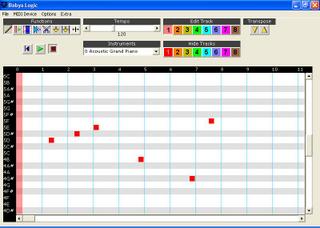
Babya Logic Audio is the main program included with Logic and Logic Pro that lets you compose music.
Below is a screenshot of the Babya Logic UI:
Today's reader mail and rumor reports looks at the recently announced Logic 2006 which is based on bMix 1.0. It's suitable for those who have Emagic/Apple Logic users , which is not available for Windows nowdays and are looking for an alternative to it .
See the press release for more information
Babya Logic Audio:
Babya Logic Audio is the main program included with Logic and Logic Pro that lets you compose music.
Below is a screenshot of the Babya Logic UI:
Babya Logic Scorer:
Babya Logic Scorer lets you easily compose and print music scores/sheet music using 2 symbol palettes. You can add:
Multiple text lines
Music lines such as:-
- Treble
- Bass
- Combined Treble and Bass lines
- Tab
- Bass Tab
Keyboard Staff lines such as:-
- Alto
- Tenor
- 8va treble
- 8vb treble
- Drum lines
- Percussion lines
- No Cleff
Monday, July 11, 2005
Reader Mail and Rumor Report-July 11, 2005:
Today's Today's Reader Mail and Rumor Report notes the release of Babya bSuite 1.5 and Babya bFile 2.
Babya bSuite 1.5:
Babya bSuite 1.5, which we reported on in April is now available to download:
http://www.simtel.net/product.php[id]89406[cid]83[SiteID]simtel.net
http://www.winsite.com/bin/Info?21000000038731
Babya bFile 2:
A new version of Babya bFile, version 2-a easy to use and powerful file manager , was also released this week:
http://www.winsite.com/bin/Info?14500000036731
http://fileforum.betanews.com/detail/Babya_bFile/1043043369/1
Today's Today's Reader Mail and Rumor Report notes the release of Babya bSuite 1.5 and Babya bFile 2.
Babya bSuite 1.5:
Babya bSuite 1.5, which we reported on in April is now available to download:
http://www.simtel.net/product.php[id]89406[cid]83[SiteID]simtel.net
http://www.winsite.com/bin/Info?21000000038731
Babya bFile 2:
A new version of Babya bFile, version 2-a easy to use and powerful file manager , was also released this week:
http://www.winsite.com/bin/Info?14500000036731
http://fileforum.betanews.com/detail/Babya_bFile/1043043369/1
Saturday, April 09, 2005
Reader Mail and Rumor Report-April 9, 2005:
Today's Reader Mail and Rumor Report looks at 2 upcoming Babya software-Babya File Browser and Babya Photo Center and news about Babya bSuite 1.5.
Babya Photo Center:
Babya Photo Center is a all in one photo editing software designed for quick editing of photos. Also it can be used with Babya Photo Workshop or separately.
With Babya Photo Center you can:
-adjust contrast/saturation and brightness
- change RGB levels in images
-easily apply effects to images
Babya Photo Center will be released early next month.
A screenshot of Babya Photo Center:
http://img71.exs.cx/img71/527/babyaphoto2wo.jpg
Babya File Browser:
Also in development is Babya File Browser-a central way to preview images before editing in Babya imaging application.
The Babya bSuite product team provided the following details about Babya File Browser at their blog which you can visit at:
http://www.livejournal.com/users/babyasoftwaregr
The next versions of the Babya imaging applications (Babya Photo Workshop, Effects FX, Babya Album) will include Babya File Browser-a central file browser-a central way to view images before editing.
Babya File Browser is currently codenamed 'Prospect'.
Today's Reader Mail and Rumor Report looks at 2 upcoming Babya software-Babya File Browser and Babya Photo Center and news about Babya bSuite 1.5.
Babya Photo Center:
Babya Photo Center is a all in one photo editing software designed for quick editing of photos. Also it can be used with Babya Photo Workshop or separately.
With Babya Photo Center you can:
-adjust contrast/saturation and brightness
- change RGB levels in images
-easily apply effects to images
Babya Photo Center will be released early next month.
A screenshot of Babya Photo Center:
http://img71.exs.cx/img71/527/babyaphoto2wo.jpg
Babya File Browser:
Also in development is Babya File Browser-a central way to preview images before editing in Babya imaging application.
The Babya bSuite product team provided the following details about Babya File Browser at their blog which you can visit at:
http://www.livejournal.com/users/babyasoftwaregr
The next versions of the Babya imaging applications (Babya Photo Workshop, Effects FX, Babya Album) will include Babya File Browser-a central file browser-a central way to view images before editing.
Babya File Browser is currently codenamed 'Prospect'.
If you have used other file browsers such as the File Browser/Adobe Bridge found in Adobe Creative Suite, it would then be easy to learn Babya File Browser as basically the UI shares common elements in both applications.
It's unclear when Babya File Browser will be released-perhaps with Babya Photo Workshop Professional 10-currently it is rumored to be released by the end of September.
Here's a screenshot of the current build:
http://img210.exs.cx/img210/4821/bfilebrws8ye.jpg
Babya bSuite 1.5:
A update to Babya bSuite, version 1.5 was announced this week and expected to be available in early May. Below is the official Babya press release for Babya bSuite 1.5:
Babya Software Group today announced Babya bSuite 1.5 -a update to Babya's ground breaking free office and digital media suite.
New in version 1.5:
-Babya bMovie HD-high definition quality video streaming solution
-Babya bMix-8 track MIDI sequencer
-Babya bFlow-visual flowcharting application
-Babya bMovie-a easy to use, 4 step movie creator
Features and Components:
Babya bSuite includes the below applications:word processing,spreadsheets,databases,slideshows and albums,web and RSS browsing,image editing,word translations,accounting software,web site creation ,audio playback/conversion.
Babya E-Type :
Babya E-Type is a word processor/script or programmer's editor with an incredible sense of style.
-Some of the features of Babya E-Type are:
Opens and saves text, Visual Basic .bas/module files (also can open other programming code files, eg. .asp, *.php or .html) and RTF files and the common .rtf format.
Babya bSheet:
-Excel style spreadsheetCan use more than 1 worksheet in a file.
Babya bAccounting:
Easy to use,Just the basics.
Comparable to QuickBooks New User Edition,Many small businesses don't need a complex package.-Includes customer management, invoicing and simple inventory management,Secure, multi-user login,Available standalone and in bSuite.
Uses a editable database.
Babya bDesign lets you integrate elements created in other Babya bSuite applications.
Stylish interface,Included with bSuite or available separately.
Comes with HTML page templates.
Outstanding Features-real time preview editing environment,HTML code editor with syntax highlighting,Dynamic action when editing your page,many cool functions.
bLogo includes an amazing and mind boggling 166 backgrounds and textures-fancy that!
Primarily for bLogo, but we thought many of you don't want to use bLogo.Pack-Volume 1:Textures and Backgrounds.
A.A. Fussy remarked, "At the first Babya Expo for 2005, building on the success of last year's 2 expos, we have bigger, better products to be announced, introduced or previewed. These products will be awe-inspiring, ground-breaking, and most important innovative and professional results, but with the ease of use, Babya programs are very famous for."
More information about Babya bSuite can be found at:
http://geocities.com/babyap2002
Pricing and Availability:
Babya bSuite 1.5 will be available as a free download in early May.
That's it for today's Reader Mail and Rumor Report. Next week we will report on some very interesting rumors about Babya Photo Workshop 10 and also news on when Babya bSecure 2 may be released.
Wednesday, March 09, 2005
Reader Mail and Rumor Report-March 9, 2005:
Today's Reader Mail and Rumor Report includes news about:a all-new Babya bPicture product line and Babya Photo Workshop Professional 9 and Babya Photo Workshop Professional XL 9 and rumors on:a minor bSuite update, a possible mid-April release for bSecure 2 and a new edition of Babya Presenter- Babya Presenter Pro.
All-new Babya bPicture product line announced:
Although a new version of Babya bPicture was expected to be released in January, it wasn't.
Ending a three month wait and shipping next month, as previously rumored ( http://tinyurl.com/4o77y) a all new bPicture product line was unveiled earlier today-version X as we expected it would be called .
Below is the press release about the new bPicture product line :
Babya Software Group today unveiled the revolutionary and all-new Babya bPicture X product line.
The two new editions, Babya bPicture X and Babya bPicture X Express offers fast and easy image management and slideshows. Also part of the Babya bPicture X product line, Babya bPicture X Professional offers a high-end digital asset management solution.
New features in version X includes:
-Easy and intergrated way to create and play slideshows
-Faster-neat if you're browsing thousands of images
-Babya Effects FX 2
-Intergration with Babya bSuite
Babya bPicture X features include:
-Babya bPicture X
-Babya Photo Workshop Professional XL for pro level image editing and over 30 new and exciting effect filters
-Babya Effects FX 2
-Babya Effects FX Studio
-Babya Album-a web album creator
-Babya Photo Workshop Mini Lab with brilliant color correction tools
-Babya Presenter-the popular Babya presentation tool
Babya bPicture X Express features:
-Babya bPicture X Express
-Babya Photo Workshop Professional XL for pro level image editing and over 30 new and exciting effect filters
-Babya Effects FX 2
-Babya Effects FX Studio
-Babya Album-a web album creator
-Babya Photo Workshop Mini Lab with brilliant color correction tools
-Babya Presenter-the popular Babya presentation tool
Pricing and Availbility:
Babya bPicture X, Babya bPicture X Professional and Babya bPicture X Express will start shipping in early April.
(C) Babya Software Group, 2004-2005. All rights reserved.
Babya Photo Workshop Professional 9 and Babya Photo Workshop Professional XL 9:
Babya Photo Workshop Professional 9 and Babya Photo Workshop Professional XL 9 are expected to be released in April with Babya Effects FX 2 included.
Babya bSuite 1.1:
A minor update to Babya bSuite, 1.1 is currently being worked on and is expected to be released soon.
Babya bSecure 2 and Babya Presenter:
Babya bSecure 2 is now delayed to a mid-April release, whilst sources indicate a Pro version of Babya Presenter is in development.
That's it for today's reader mail and rumor report.
Today's Reader Mail and Rumor Report includes news about:a all-new Babya bPicture product line and Babya Photo Workshop Professional 9 and Babya Photo Workshop Professional XL 9 and rumors on:a minor bSuite update, a possible mid-April release for bSecure 2 and a new edition of Babya Presenter- Babya Presenter Pro.
All-new Babya bPicture product line announced:
Although a new version of Babya bPicture was expected to be released in January, it wasn't.
Ending a three month wait and shipping next month, as previously rumored ( http://tinyurl.com/4o77y) a all new bPicture product line was unveiled earlier today-version X as we expected it would be called .
Below is the press release about the new bPicture product line :
Babya Software Group today unveiled the revolutionary and all-new Babya bPicture X product line.
The two new editions, Babya bPicture X and Babya bPicture X Express offers fast and easy image management and slideshows. Also part of the Babya bPicture X product line, Babya bPicture X Professional offers a high-end digital asset management solution.
New features in version X includes:
-Easy and intergrated way to create and play slideshows
-Faster-neat if you're browsing thousands of images
-Babya Effects FX 2
-Intergration with Babya bSuite
Babya bPicture X features include:
-Babya bPicture X
-Babya Photo Workshop Professional XL for pro level image editing and over 30 new and exciting effect filters
-Babya Effects FX 2
-Babya Effects FX Studio
-Babya Album-a web album creator
-Babya Photo Workshop Mini Lab with brilliant color correction tools
-Babya Presenter-the popular Babya presentation tool
Babya bPicture X Express features:
-Babya bPicture X Express
-Babya Photo Workshop Professional XL for pro level image editing and over 30 new and exciting effect filters
-Babya Effects FX 2
-Babya Effects FX Studio
-Babya Album-a web album creator
-Babya Photo Workshop Mini Lab with brilliant color correction tools
-Babya Presenter-the popular Babya presentation tool
Pricing and Availbility:
Babya bPicture X, Babya bPicture X Professional and Babya bPicture X Express will start shipping in early April.
(C) Babya Software Group, 2004-2005. All rights reserved.
Babya Photo Workshop Professional 9 and Babya Photo Workshop Professional XL 9:
Babya Photo Workshop Professional 9 and Babya Photo Workshop Professional XL 9 are expected to be released in April with Babya Effects FX 2 included.
Babya bSuite 1.1:
A minor update to Babya bSuite, 1.1 is currently being worked on and is expected to be released soon.
Babya bSecure 2 and Babya Presenter:
Babya bSecure 2 is now delayed to a mid-April release, whilst sources indicate a Pro version of Babya Presenter is in development.
That's it for today's reader mail and rumor report.
Friday, February 04, 2005
Reader Mail and Rumor Report-February, 3 2005:
Today's Reader Mail and Rumor Report includes some very exciting news on the long-awaited Babya desktop search software, Babya Fractal Studio and Babya Effects FX 2.
Updated April 9, 2005 to include the latest information about the Babya desktop search software.
Babya Effects FX 2:
Babya Effects FX 2 is about to be released later this month, A.A. Fussy commented on this
" Babya Effects FX 2 includes a additional 34 wacky and zany image effects-some are very cool. We'll release it as part of Babya Photo Workshop 8 and XL Babya Photo Workshop 8.1."
Babya desktop search software:
Just as we go to publish today's report, only 30 minutes ago-Babya bDesktop Toolbar was intrdouced.
The slogan being used for bDesktop Toolbar is "Life is random":
You might wonder what the slogan means-A.A. Fussy explains below, what the Babya bDesktop Toolbar's slogan "Life is random" means:
"Life is random represents the unpredictably of what search results you get when you use Babya bDesktop Toolbar because you you can search in various categories and different search engines and you never know what the results might turn up.
You can even load it onto a iPod shuffle for instance, as some of the space can be allocated as storage on that or any USB flash drive."
Although the Babya desktop search software has not been announced yet, but it could be announced in the next 2-3 days.
Overall, we are very impressed and were suprised that it wasn't what we expected to be announced -a web toolbar that does not install any spyware, but actually was announced tonight.
Best of all, you can use and download it for free, right now at:
http://www.effectivebrand.com/LandingPage.aspx/CT35254
Update-April 9, 2005:The Babya desktop search suite is currently close to completing development and will be called called Babya bFind
Babya bSecure:
Last week we mentioned that Babya bSecure was to be released early this week. Suprisingly, it was not announced at all. Apparently the release date was pushed back to March.
Babya Fractal Studio:
Babya Fractal Studio again is something we didn't expect, but anyway it generates incredible and surrealistic images and wasy to use-a description:
Babya Fractal Studio-one of the most professional way to generate interesting and unusual fractal images.
Babya Fractal Studio includes features such as:
Fractal types inclusing- Mandelbrot, Julia set generation can be selected to create your image, a easy to use and customisable image effects system, a color palette creator similar in function to Babya Photo Workshop Professional's color palette editor.
Fast and quite mind boggling effects are easily achievable with Babya Fractal Studio in a matter of minutes.
Babya Software Group's A.A. Fussy commented "Babya Fractal Studio is is one of most sophisticated fractal generators available for PC users."
Again, it's available now as well:
http://home.ripway.com/2004-12/221036/bfstudio.zip
Update-October 22, 2005: http://www.winsite.com/bin/Info?26000000038730
Today's Reader Mail and Rumor Report includes some very exciting news on the long-awaited Babya desktop search software, Babya Fractal Studio and Babya Effects FX 2.
Updated April 9, 2005 to include the latest information about the Babya desktop search software.
Babya Effects FX 2:
Babya Effects FX 2 is about to be released later this month, A.A. Fussy commented on this
" Babya Effects FX 2 includes a additional 34 wacky and zany image effects-some are very cool. We'll release it as part of Babya Photo Workshop 8 and XL Babya Photo Workshop 8.1."
Babya desktop search software:
Just as we go to publish today's report, only 30 minutes ago-Babya bDesktop Toolbar was intrdouced.
The slogan being used for bDesktop Toolbar is "Life is random":
You might wonder what the slogan means-A.A. Fussy explains below, what the Babya bDesktop Toolbar's slogan "Life is random" means:
"Life is random represents the unpredictably of what search results you get when you use Babya bDesktop Toolbar because you you can search in various categories and different search engines and you never know what the results might turn up.
You can even load it onto a iPod shuffle for instance, as some of the space can be allocated as storage on that or any USB flash drive."
Although the Babya desktop search software has not been announced yet, but it could be announced in the next 2-3 days.
Overall, we are very impressed and were suprised that it wasn't what we expected to be announced -a web toolbar that does not install any spyware, but actually was announced tonight.
Best of all, you can use and download it for free, right now at:
http://www.effectivebrand.com/LandingPage.aspx/CT35254
Update-April 9, 2005:The Babya desktop search suite is currently close to completing development and will be called called Babya bFind
Babya bSecure:
Last week we mentioned that Babya bSecure was to be released early this week. Suprisingly, it was not announced at all. Apparently the release date was pushed back to March.
Babya Fractal Studio:
Babya Fractal Studio again is something we didn't expect, but anyway it generates incredible and surrealistic images and wasy to use-a description:
Babya Fractal Studio-one of the most professional way to generate interesting and unusual fractal images.
Babya Fractal Studio includes features such as:
Fractal types inclusing- Mandelbrot, Julia set generation can be selected to create your image, a easy to use and customisable image effects system, a color palette creator similar in function to Babya Photo Workshop Professional's color palette editor.
Fast and quite mind boggling effects are easily achievable with Babya Fractal Studio in a matter of minutes.
Babya Software Group's A.A. Fussy commented "Babya Fractal Studio is is one of most sophisticated fractal generators available for PC users."
Again, it's available now as well:
http://home.ripway.com/2004-12/221036/bfstudio.zip
Update-October 22, 2005: http://www.winsite.com/bin/Info?26000000038730
Saturday, January 29, 2005
Reader Mail and Rumor Report-January 28, 2005:
Today's reader mail reports looks at the upcoming Babya System 14.0 and rumors on Babya bSuite.
Babya System 14.0
The next major release includes many of the Babya System applications from v 13.0, plus Babya bSuite. It's expected to be out in 1-2 months.
Babya bSuite:
Babya bSuite has started shipping, alongside Babya bPlayer, Babya Presenter 2.0, and Babya Discoverer RSS 11.0.
Babya bSecure 2.0:
The long awaited update is expected to be announced as early as next Monday and released a couple of days after.
That's it for today's Reader Mail and Rumor Report-next week we look at bSuite and bMix, Babya bFind-the Babya desktop search and more!:
Today's reader mail reports looks at the upcoming Babya System 14.0 and rumors on Babya bSuite.
Babya System 14.0
The next major release includes many of the Babya System applications from v 13.0, plus Babya bSuite. It's expected to be out in 1-2 months.
Babya bSuite:
Babya bSuite has started shipping, alongside Babya bPlayer, Babya Presenter 2.0, and Babya Discoverer RSS 11.0.
Babya bSecure 2.0:
The long awaited update is expected to be announced as early as next Monday and released a couple of days after.
That's it for today's Reader Mail and Rumor Report-next week we look at bSuite and bMix, Babya bFind-the Babya desktop search and more!:
Friday, January 28, 2005
BABYA EXPO:Babya bSuite Released:
Babya bSuite-a ground breaking free office and digital media suite.
Requires .NET framework, Windows 98 or later (some components require Windows 2000/XP/Server 2003)-includes the below:-word processing-spreadsheets-databases-slideshows and albums
-web and RSS browsing-image editing
-word translations-accounting software
-web site creation-audio playback/conversion
Components:
Babya E-Type-the bSuite word processor with a incredible
sense of style.-
Babya E-Type features:
-Babya E-Type is a word processor/script or programmer's editor with a incredible sense
of style.
-Some of the features of Babya E-Type are:-*MDI/tabbed interface (similar in style to Babya Discoverer)
-*Easy access to files via a file explorer task pane
-*Can be used as a programmer’s text editor/script editor
-*Opens and saves text, Visual Basic .bas/module files (also can open other programming
code files, eg. .asp, *.php or .html) and RTF files (can open files of unlimited sizes, unlike
Notepad on Windows 95/98/ME systems) and the common .rtf format.
-*Can export documents to PDF, if you have PDF creation software installed (such as
Adobe® Acrobat® or Ghostscript)
-*Also can be installed and used from a USB Flash drive-very compact when installed
-*Multiple item clipboard
-*Encrypt and decrypt text files feature for extra file security
-*Document compare
-*Can use/intergrate files from other Babya or third-party software-create compound
documents
Babya bSheet::
Excel style spreadsheet
-Can use more than 1 worksheet in a file
-Easy to use
Babya bAccounting:
Just the basics
-Compareable to QuickBooks New User Edition-Many small businesses don't need a complex package
-Includes customer management, invoicing and simple inventory management-Secure, multi-user login
-Available standalone and in bSuite-Uses a editable .mdb database
Babya Discoverer RSS:
First update in nearly a year to the popular Babya web browser
-New look icon and splash screen and new look UI
-A new name for Babya Discoverer-Babya Discoverer RSS (11.0)
-Includes a download manager
-RSS viewer included-Babya bView (available separately)
-Access to Windows XP Service Pack 2's Security Center from Babya Discoverer RSS
-Babya bDesign lets you integrate elements created in other Babya bSuite applications-Replaces bWeb.
-Easy to use, creates professional looking sites quickly and with a minimum of fuss.
-Stylish interface-Included with bSuite or available separately
.-Comes with HTML page templates
-Outstanding Features:
-real time preview editing environment
-HTML code editor with syntax highlighting
-Dynamic action when editing your page
-Many many cool functions
.-Uses CodeMax for certain features
-bLogo includes an amazing and mind boggling 166 backgrounds and
textures-fancy that!
-Primarily for bLogo, but we thought many of you don't want to use bLogo.
Babya Presenter Pack-Volume 1:Textures and Backgrounds
.-Use them in any application, as desired
-There will be addiitional volumes released throught 2005
bPlayer 2:
-A lot like MusicMatch, WMP or iTunes
-Uses Windows Media and Bass audio library technologies-All in one-no longer you need a separate program to convert audio.
-Built in Wav2MP3-now called Babya Shuffle.-"The best new feature in version 2.0-converts music into more audio formats (such as
.mp3 and .wma) that can be copied,for example, to an Apple(R) iPod(R) and other MP3 players."
- Babya Unwritten:
-"Easily translate a word into-eg. French."
-Compact and unobtrusive, can be used off a USB flash drive-Included with bSuite or downloadable.
Babya bSuite was announced at the Babya Expo and is now available to download.
Download:
Babya bSuite-Winsite
Babya bSuite-a ground breaking free office and digital media suite.
Requires .NET framework, Windows 98 or later (some components require Windows 2000/XP/Server 2003)-includes the below:-word processing-spreadsheets-databases-slideshows and albums
-web and RSS browsing-image editing
-word translations-accounting software
-web site creation-audio playback/conversion
Components:
Babya E-Type-the bSuite word processor with a incredible
sense of style.-
Babya E-Type features:
-Babya E-Type is a word processor/script or programmer's editor with a incredible sense
of style.
-Some of the features of Babya E-Type are:-*MDI/tabbed interface (similar in style to Babya Discoverer)
-*Easy access to files via a file explorer task pane
-*Can be used as a programmer’s text editor/script editor
-*Opens and saves text, Visual Basic .bas/module files (also can open other programming
code files, eg. .asp, *.php or .html) and RTF files (can open files of unlimited sizes, unlike
Notepad on Windows 95/98/ME systems) and the common .rtf format.
-*Can export documents to PDF, if you have PDF creation software installed (such as
Adobe® Acrobat® or Ghostscript)
-*Also can be installed and used from a USB Flash drive-very compact when installed
-*Multiple item clipboard
-*Encrypt and decrypt text files feature for extra file security
-*Document compare
-*Can use/intergrate files from other Babya or third-party software-create compound
documents
Babya bSheet::
Excel style spreadsheet
-Can use more than 1 worksheet in a file
-Easy to use
Babya bAccounting:
Just the basics
-Compareable to QuickBooks New User Edition-Many small businesses don't need a complex package
-Includes customer management, invoicing and simple inventory management-Secure, multi-user login
-Available standalone and in bSuite-Uses a editable .mdb database
Babya Discoverer RSS:
First update in nearly a year to the popular Babya web browser
-New look icon and splash screen and new look UI
-A new name for Babya Discoverer-Babya Discoverer RSS (11.0)
-Includes a download manager
-RSS viewer included-Babya bView (available separately)
-Access to Windows XP Service Pack 2's Security Center from Babya Discoverer RSS
-Babya bDesign lets you integrate elements created in other Babya bSuite applications-Replaces bWeb.
-Easy to use, creates professional looking sites quickly and with a minimum of fuss.
-Stylish interface-Included with bSuite or available separately
.-Comes with HTML page templates
-Outstanding Features:
-real time preview editing environment
-HTML code editor with syntax highlighting
-Dynamic action when editing your page
-Many many cool functions
.-Uses CodeMax for certain features
-bLogo includes an amazing and mind boggling 166 backgrounds and
textures-fancy that!
-Primarily for bLogo, but we thought many of you don't want to use bLogo.
Babya Presenter Pack-Volume 1:Textures and Backgrounds
.-Use them in any application, as desired
-There will be addiitional volumes released throught 2005
bPlayer 2:
-A lot like MusicMatch, WMP or iTunes
Introducing bPlayer v 2.0 with Babya Shuffle:
-Features-very powerful music player-effortsly manage, play and convert music-View ID3 tags, manage playlists and organise your music albums.-Uses Windows Media and Bass audio library technologies-All in one-no longer you need a separate program to convert audio.
-Built in Wav2MP3-now called Babya Shuffle.-"The best new feature in version 2.0-converts music into more audio formats (such as
.mp3 and .wma) that can be copied,for example, to an Apple(R) iPod(R) and other MP3 players."
- Babya Unwritten:
-"Easily translate a word into-eg. French."
-Compact and unobtrusive, can be used off a USB flash drive-Included with bSuite or downloadable.
Babya bSuite was announced at the Babya Expo and is now available to download.
Download:
Babya bSuite-Winsite
BABYA EXPO: Babya bPlayer, Babya Discoverer RSS and Babya Presenter 2.0 Released:
Babya bPlayer, Babya Discoverer RSS and Babya Presenter 2.0, which were announced at the Babya Expo are all now available to download:
Babya Discoverer RSS-FileForum
Babya Presenter 2.0 -FileForum
Monday, January 24, 2005
iReader Mail and Rumor Report-January 24, 2005
Today's Reader Mail and Rumor Report reports on the Babya Expo, Babya bMix and an Babya bSecure update, Babya Photo Workshop Pro being axed, updates on the Babya movie editor and desktop search and note the release of Babya Photo Workshop Professional XL 8.0.
Babya Expo:
The Babya Expo is nearly over and we report on, some of the more impressive announcements and new products that were on show:
Today's Reader Mail and Rumor Report reports on the Babya Expo, Babya bMix and an Babya bSecure update, Babya Photo Workshop Pro being axed, updates on the Babya movie editor and desktop search and note the release of Babya Photo Workshop Professional XL 8.0.
Babya Expo:
The Babya Expo is nearly over and we report on, some of the more impressive announcements and new products that were on show:
Babya bSecure/bZip:
Not demoed or announced, bSecure 2 is going well in development-A.A. says to expect a release early next week, with bSuite introduced.
Also version 2.0 archives files and there is also bZip, available standalone (saves in a custom file format).
Babya bFile 2:
Babya bFile 2 was announced and A.A. generously added that a CD cataloguer is include-out in 3 weeks, he mentioned.
Babya bSuite:
Babya bSuite is available starting from next month.
We were totally stunned when A.A. Fussy demoed a new 8-track Garageband style, sequencer-Babya , Babya bMix.
Available separately or with bSuite in February according to Fussy , features include
- Create music like Michael Jackson (or other artists)
- Powerful music composition
- Compose on up to 8 multiple audio tracks
- MIDI based with MIDI export
- 174 software instruments
- Adjust tempo and transpose tracks
- Notate music with over 30 tracks available
- Easy to use:
A.A. wowed the audience with a demo of some of the 174 software instruments available in bMix-for example:
- bass
- glockenspiel
- marimba
- Synthetic brass
- Shakuhachi (a oriental style of music)
- Guiro
- Sound FX effects
- Cabasa
- Shanai (another oriental style of music)- accordingn to A.A. "One night in Bangkok and Shanai's your music oyster"
Screenshot:
http://geocities.com/babyap2002/babya_3.jpg
All tracks are displayed in contrasting colours, for easy indentification, A.A. noted.
Babya, our regular reader was really in harmony with the demo of the Guiro instrument:
"Wow, now that's what I call funky music!"
We'll be trying bMix out in the week or so, and we'll report on it closer to the release of bMix .
GooGNews:
One other application shown was GooGNews, a versatile Google toolbar.
Tay Wei Kiat ( who provided the base source code for the latest Babya Discover) introduced GooGNews at the Babya Expo:
Tay Wei Kiat, former director of WickedSoft current director of Unignal Software Team who provided the base source code for the latest Babya Discover has come out with a new useful application!
GooGNews- Good News for Google News Users
A customizable, user-friendly and FREE toolbar that allows you immediate access to the lastest Google headline news, GooGNews is a must-have for users who wants to be constantly updated with the lastest events or happenings, and armed with the lastest piece of information that is made availabe on the Internet.
Why not just go to Google News? Keeping a browser open all the time just to keep abreast of the news is not always practical. GooGNews comes to the rescue! Don't miss out on the news just because you don't want to open a web browser!
With GooGNews, users no longer need manually browse through scrolls of irrevelant news in the Google News to obtain the information they wanted. No longer do they need to check their mail more than frequently to be updated with the lastest headline news. GooGNews do so much work of you, that it makes news browsing seems so easy, fast and convenient.
And it won't take up much space in your desktop. The headline of all Google news are summarized and displayed in just one line, taking up approximately only 5% of your total desktop space!
Moreover, GooGNews comes with a powerful search bar. The bar allows you to search all major search engines and dictionaries. Before is a full list of search engine services that you can access directly through GooGNews Search Bar:
-Google Web
-Google Images
-Google Groups
-Google News
-Open Website (You may enter website address here to open the that website)
-Dictionary.com
-Spell Check (Powered by Dictionary.com)
-Wikipedia
-Wiktionary
-Wikibooks
-Wikiquote
-Wikisource
-Wikispecies
-Wikinews
-Yahoo! Web
-Yahoo! Images
-Yahoo! Directory
-Yahoo! News
-Msn Web
-Msn News
-Msn Dictionary
-Msn Encarta
-Msn Stock Quotes
-Msn Movies
-Msn Shopping
(Users may request the author to add more search services to GooGNews Search Bar by sending a feedback to the author via the built in "Submit Feedback" feature in GooGNews, which can be accessed by Menu -> Help -> Submit Feedback)
Below are detailed breakdown of other features/options found in GooGNews and additional information about their usage.
1)Show Latest News Only
Use: On average, Google News Homepage contains 100++ news articles. It may seem like a good idea to display all of these news on GooGNews. In actual fact, many of the news are actually repeats. Google News works by pushing each related News one "step" down whenever a newer version of the same News is discovered. Hence, by activating "Show Latest News Only" feature, GooGNews automatically filter out older News and display only the latest. This allows you to be constantly updated about what is happening around the world without reading through all the 100++ News.
How to access: Menu->Show Latest News Only
2)Fast Scrolling
Use: Everyone read at a different speed. The default scrolling speed of headlines in GooGNews may be too slow for some, thus there is a need to provide fast readers another options. Enabling Fast Scrolling increases the scrolling speed drastically.
How to access: Menu->More Options->Fast Scrolling
3)Auto Refresh News
Use: News are not static. Updates can appear anytime. Hence, it is necessary to be updated about happenings around the world constantly. Enabling this option will cause GooGNews to automatically "Refresh News" every 30 minutes, which is not long enough for you to miss out any News update, while not short enough for you to finish going through all 100++ News if you want to.
How to access: Menu->More Options->Auto Refresh News
4)Quick View
Use: Whenever you do a search using GooGNews Search bar or click on any scrolling News article, GooGNews will attempt to launch the website. GooGNews gives you the options of viewing the website in your default web browser, or using the built in web browser in GooGNews. Enabling Quick View allows you to launch web pages using the built in browser, while disabling it cause GooGNews to lanuch web pages using your default browser. Quick View is enabled by default, and highly recommended as Quick View saves you the trouble of waiting for your web browser to load.
How to access: Menu->More Options->Quick View
5)Vibration Alert
Use: Whenever GooGNews is ready to start scrolling the latest headlines from Google News, the main GooGNews bar will vibration for a short amount of time, at the same time displaying the number of valid News articles it detected. Vibration alert engage your attention whenever News update is available.
How to access: Menu->More Options->Vibration Alert
6)Google News Home
Use: You may sometime feel the need to visit the Google News Homepage. Clicking on this allows you to do so directly.
How to access: Menu->Google News Home
7)Auto Snap To Screen Edge
Use: If this option is enabled, moving GooGNews near to any of your screen edge will cause GooGNews to automatically dock at the edge.
How to access: Menu->More Options->Auto Snap To Screen Edge
8)Set Transparency
Use: Do you like/dislike the default see-through property of GooGNews bar? Change the transparency of GooGNews by using this option.
How to access: Menu->More Options->Set Transparency
9)Submit Feedback
Use: Feel that you have any suggestions/feedbacks/comments/complaints you want to make to the author? Submit your feedback via the built in Submit Feedback system!
How to access: Menu->Help->Submit Feedback
10)GooGNews Update Manager
Use: This feature is normally hidden. It attempts to check for any GooGNews update whenever GooGNews is used. If no update is found, the update manager will quietly close itself. However, if an update is found, a dialog will be displayed, providing you with relevant information about the update and how to get it.
How to access: Menu->Help->Submit Feedback
11)Notebox
Use: Select Notebox from the menu launches a seemingly useless window which consisted of nothing but an empty textbox and a "Save" button. Infect, Notebox is quite useful. When using Quick View, you can select text from the built in web browser and drag it into the textbox in Notebox window. Pressing the save button allows you to save the textbox's content in either plain text or rich text format.
How to access: Quick View Options->Notebox
12)Spell Check
Use: Need to spell a word and simply can't recall how to spell it? No fear! GooGNew's latest feature, Spell Check allows you to check your spelling directly from the GooGNews Search bar!
How to access: Enter roughly what you think is the correct spelling of the word in the GooGNews Search bar and select "Spell Check" from the drop down list. Press enter. A dialog will shortly appear, telling you if the word is spelled correctly and giving suggestions if it is not. This feature makes use of dictionary.com to do the checking.
13)Open Website
Use: For your convenient, we can now select "Open Website" from the drop down combo of the Search Bar and enter the address of the website you wish to launch and have GooGNews open it for you either via GooGNew's built in browser or your default browser, depending on your settings.
How to access: Select "Open website" from the drop down combo of the search bar and enter the url of the website you want to open into the textbox on the left. Then, press enter.
14)Region Selection
Use: Google News provides different internation versiob for each regions. This feature allows you to chose the region which is news is meant for.
How to access: Menu->More options->Select GooGNews Region
15)News vault
Use: An easy feature to archive News links url to a file named News Vault.txt
How to access: Activate quick view, press "Quick View Menu", select "Dump to News Vault"
Download/more details at:
http://fileforum.betanews.com/detail/1104463252/1
Sounds intriguing-we'll report on it very soon.
Babya Photo Workshop XL:
Babya Photo Workshop XL 8 was released on January, 21 with a redesigned interface. We predicted it would be version 7.2 but we are completely suprised that it's version 8.
Babya Desktop Search:
In December, we noted that a Babya Desktop Search software was in development. It now looks set to be released in late February-though we aren't sure if that is offcial just at the moment. We'll update on this throughout the next month or so.
Babya Movie Editor:
Although not announced yet-bSuite will include Babya bMovie, a easy to use, 4 step movie maker-Babya bMovie.
A.A. Fussy demoed it at the Babya Expo-here's what he said "We are offering the quickest video editor currently-just takes 4 steps to make a movie."
Babya Photo Workshop:
Babya Photo Workshop Pro 7 is likely to be discontinued in the next few weeks for the introduction of version 8.0-now set for a March release, apparently.
Sunday, January 23, 2005
Babya bSuite Up To Date
Do you own and use a previous version of the below Babya bSuite applications? If you do, you might be eligible for an upgrade to bSuite. Fill out the form below, to see if you can upgrade to bSuite.
What is Babya bSuite:
Take photos? Need to create a document? Convert or listen to music? Even if you’ve never considered yourself a creative person, Babya bSuite — a suite of tightly integrated applications that places no limit on your talent or creativity — makes it easy and fun to learn new skills.
Babya bSuite offers major and new versions of Babya Discoverer , Babya Photo Workshop , Babya Presenter , and the new Babya bDesign , Babya Unwritten, Babya bAccounting, Babya bSheet , Babya bLogo and Babya bCal.
With Babya bSuite ‘05, the must-have upgrade for everyone who uses a PC or even a Mac with previous releases of Babya bSuite's included software (all of bSuite can, of course save in common formats), you can easily create stunning documents, websites and presentations import, organize, and edit photos with EXIF data; and stun them with fully customizable slideshows using Babya Presenter. Babya bPlayer 2 converts and syncs with every member of the iPod family , a MP3 player or a Portable Media Center. You won’t find a better or easier to use set of creative tools than Babya bSuite.
We would like to give you the opportunity to upgrade to Babya bSuite for no cost .*
Babya applications:
Babya Word Processors Product: Versions: Eligible? Can the software be upgraded to bSuite? BabyaText 3.12 No1 No MemoWriter 1.0, 1.1 Yes Yes Constellation2.0 2.0 Yes2 Yes2 Babya System Babya System 7.1, 8.0, 9.0 Yes Yes 9.1, 9.15, 9.3 9.0/9.3-Yes29.15-Yes2 9.0/9.3-Yes29.15-No2
10.0, 10.0.1, 10.1 Yes Yes 11.0, 11.1, 11.2, 11.3 Yes- 11.0/11.1/11.3 No -11.22 Yes-11.0/11.1/11.3No -11.22 12.0, 12.0.1, 12.0.2, 12.0.3, 12.0.4, 12.0.6, 12.0.7, 12.0.8, 12.0.9, 12.1, 12.2
Yes Yes-direct bSuite upgrade 13.0, 14.0 Yes Yes-direct bSuite upgrade Babya Discoverer Babya Discoverer 3.0-5.5 No4 No4 6.0-8.0 Yes Yes Babya Discoverer RSS
11.0 Yes Included in bSuite Babya Photo Workshop Babya Photo Workshop Professional 1.0-5.0 Yes Yes 5.0-7.0 Yes Yes-direct to v 8.0 or 7.5 (bundled in Babya bSuite) Babya Photo Workshop Standard/Express 1.0-8.0 Yes Yes4 Babya Photo Workshop XL 7.0,7.1 Yes Direct to version 8
Babya bSuite System RequirementsWindows or Macintosh computer with a Pentium III 800MHz PowerPC G3/G4 1GHz or faster 256MB of RAM; 512MB recommended 32MB graphics card with pixel shader 1.1 support (Mac: 32MB VRAM, Core Image compliant) Windows 98-XP or Mac OS X v10.2 or later (does not run on Windows 95 or Mac OS 9) Some bSuite Babya applications require Microsoft .NET Framework 1.1/2.0 and Windows 2000 or XP Virtual PC 6.1/7.0 or similar for use on Macs 30-50MB HD Space QuickTime 6.5.2 Babya bSuite Up-To-DateCustomers who purchase a qualifying new Macintosh or Windows computer on or after January 11, 2005 that does not have Babya bSuite included can upgrade to Babya bSuite.If you purchased your system directly from the Babya online store, follow one of these links to participate in the program. Subject to terms and conditions.
For our international customers register and submit a support ticket at:
http://exocrew.com/helpdesk/index.php
If you purchased your system from an Babya website or an Babya authorized reseller, fill out one of these below , to participate in the program.
Enrol in Babya bSuite Up To Date :
Babya bSuite Up To DateName:
Babya product to upgrade?
E-mail address:
1.Eligible for standalone upgrade to a similar Babya software only (eg. E-Type, Discoverer) 2. Babya System bundled versions /Babya System are both eligible for a bSuite upgrade. 3.*Product availability: February , 2005 4.Babya Discoverer and Photo Workshop can be upgraded with bSuite or for versions before 11.0/ 5.0, separately
© Babya Software Group, 2005
Saturday, January 22, 2005
Tay Wei Kiat, former director of WickedSoft current director of Unignal Software Team who provided the base source code for the latest Babya Discover has come out with a new useful application!
GooGNews- Good News for Google News Users
A customizable, user-friendly and FREE toolbar that allows you immediate access to the lastest Google headline news, GooGNews is a must-have for users who wants to be constantly updated with the lastest events or happenings, and armed with the lastest piece of information that is made availabe on the Internet.
Why not just go to Google News? Keeping a browser open all the time just to keep abreast of the news is not always practical. GooGNews comes to the rescue! Don't miss out on the news just because you don't want to open a web browser!
With GooGNews, users no longer need manually browse through scrolls of irrevelant news in the Google News to obtain the information they wanted. No longer do they need to check their mail more than frequently to be updated with the lastest headline news. GooGNews do so much work of you, that it makes news browsing seems so easy, fast and convenient.
And it won't take up much space in your desktop. The headline of all Google news are summarized and displayed in just one line, taking up approximately only 5% of your total desktop space!
Moreover, GooGNews comes with a powerful search bar. The bar allows you to search all major search engines and dictionaries. Before is a full list of search engine services that you can access directly through GooGNews Search Bar:
-Google Web
-Google Images
-Google Groups
-Google News
-Open Website (You may enter website address here to open the that website)
-Dictionary.com
-Spell Check (Powered by Dictionary.com)
-Wikipedia
-Wiktionary
-Wikibooks
-Wikiquote
-Wikisource
-Wikispecies
-Wikinews
-Yahoo! Web
-Yahoo! Images
-Yahoo! Directory
-Yahoo! News
-Msn Web
-Msn News
-Msn Dictionary
-Msn Encarta
-Msn Stock Quotes
-Msn Movies
-Msn Shopping
(Users may request the author to add more search services to GooGNews Search Bar by sending a feedback to the author via the built in "Submit Feedback" feature in GooGNews, which can be accessed by Menu -> Help -> Submit Feedback)
Below are detailed breakdown of other features/options found in GooGNews and additional information about their usage.
1)Show Latest News Only
Use: On average, Google News Homepage contains 100++ news articles. It may seem like a good idea to display all of these news on GooGNews. In actual fact, many of the news are actually repeats. Google News works by pushing each related News one "step" down whenever a newer version of the same News is discovered. Hence, by activating "Show Latest News Only" feature, GooGNews automatically filter out older News and display only the latest. This allows you to be constantly updated about what is happening around the world without reading through all the 100++ News.
How to access: Menu->Show Latest News Only
2)Fast Scrolling
Use: Everyone read at a different speed. The default scrolling speed of headlines in GooGNews may be too slow for some, thus there is a need to provide fast readers another options. Enabling Fast Scrolling increases the scrolling speed drastically.
How to access: Menu->More Options->Fast Scrolling
3)Auto Refresh News
Use: News are not static. Updates can appear anytime. Hence, it is necessary to be updated about happenings around the world constantly. Enabling this option will cause GooGNews to automatically "Refresh News" every 30 minutes, which is not long enough for you to miss out any News update, while not short enough for you to finish going through all 100++ News if you want to.
How to access: Menu->More Options->Auto Refresh News
4)Quick View
Use: Whenever you do a search using GooGNews Search bar or click on any scrolling News article, GooGNews will attempt to launch the website. GooGNews gives you the options of viewing the website in your default web browser, or using the built in web browser in GooGNews. Enabling Quick View allows you to launch web pages using the built in browser, while disabling it cause GooGNews to lanuch web pages using your default browser. Quick View is enabled by default, and highly recommended as Quick View saves you the trouble of waiting for your web browser to load.
How to access: Menu->More Options->Quick View
5)Vibration Alert
Use: Whenever GooGNews is ready to start scrolling the latest headlines from Google News, the main GooGNews bar will vibration for a short amount of time, at the same time displaying the number of valid News articles it detected. Vibration alert engage your attention whenever News update is available.
How to access: Menu->More Options->Vibration Alert
6)Google News Home
Use: You may sometime feel the need to visit the Google News Homepage. Clicking on this allows you to do so directly.
How to access: Menu->Google News Home
7)Auto Snap To Screen Edge
Use: If this option is enabled, moving GooGNews near to any of your screen edge will cause GooGNews to automatically dock at the edge.
How to access: Menu->More Options->Auto Snap To Screen Edge
8)Set Transparency
Use: Do you like/dislike the default see-through property of GooGNews bar? Change the transparency of GooGNews by using this option.
How to access: Menu->More Options->Set Transparency
9)Submit Feedback
Use: Feel that you have any suggestions/feedbacks/comments/complaints you want to make to the author? Submit your feedback via the built in Submit Feedback system!
How to access: Menu->Help->Submit Feedback
10)GooGNews Update Manager
Use: This feature is normally hidden. It attempts to check for any GooGNews update whenever GooGNews is used. If no update is found, the update manager will quietly close itself. However, if an update is found, a dialog will be displayed, providing you with relevant information about the update and how to get it.
How to access: Menu->Help->Submit Feedback
11)Notebox
Use: Select Notebox from the menu launches a seemingly useless window which consisted of nothing but an empty textbox and a "Save" button. Infect, Notebox is quite useful. When using Quick View, you can select text from the built in web browser and drag it into the textbox in Notebox window. Pressing the save button allows you to save the textbox's content in either plain text or rich text format.
How to access: Quick View Options->Notebox
12)Spell Check
Use: Need to spell a word and simply can't recall how to spell it? No fear! GooGNew's latest feature, Spell Check allows you to check your spelling directly from the GooGNews Search bar!
How to access: Enter roughly what you think is the correct spelling of the word in the GooGNews Search bar and select "Spell Check" from the drop down list. Press enter. A dialog will shortly appear, telling you if the word is spelled correctly and giving suggestions if it is not. This feature makes use of dictionary.com to do the checking.
13)Open Website
Use: For your convenient, we can now select "Open Website" from the drop down combo of the Search Bar and enter the address of the website you wish to launch and have GooGNews open it for you either via GooGNew's built in browser or your default browser, depending on your settings.
How to access: Select "Open website" from the drop down combo of the search bar and enter the url of the website you want to open into the textbox on the left. Then, press enter.
14)Region Selection
Use: Google News provides different internation versiob for each regions. This feature allows you to chose the region which is news is meant for.
How to access: Menu->More options->Select GooGNews Region
15)News vault
Use: An easy feature to archive News links url to a file named News Vault.txt
How to access: Activate quick view, press "Quick View Menu", select "Dump to News Vault"
Download/more details at:
GoogNews
Babya Presenter 2 unveiled at the Babya Expo:
Babya Presenter 2.0 was released this week, at the Babya Expo.
Babya Presenter is a easy to use presentation package, with a basic and a 'studio' interface. Many images are provided. It can integrate with Babya Photo Workshop Professional.
Primarily for bLogo, but we thought many of you don't want to use bLogo.Pack-Volume 1:Textures and Backgrounds.Use them in any application, as desired.There will be addiitional volumes released throught 2005.Babya Presenter 2 is out later this month alongside Babya Presenter.
Pack-Volume 1:Textures and Backgrounds.
Available separately, with Presenter 2 and in bSuite.One more most request feature-set up customized full screen slideshows as a
screensaver and also with music,Babya Presenter 2 lets you do that with ease,Updated Babya Album also supports this feature-version 2.
Downloads:
Friday, January 21, 2005
Babya Software Group Updates Babya Photo Workshop Professional XL
(PRWEB) January 22, 2005 -- Babya Software Group today updated Babya Photo Workshop Pro XL to v 8.0, with a redesigned UI. Babya Photo Workshop Pro v 8.0 will be available soon.
Features:
This new addition to the popular Babya Photo Workshop image editor product line has all features from Babya Photo Workshop Professional that are a breeze to use and offers new and enhanced editing features such as gradients, advanced selection masks, neat and unusual drawing tools, a impressive pallete editor and layers support via a 'stack' tool and built-in file browser modelled closely on bPicture's image sorter tool.
In addition, Babya Photo Workshop Professional XL includes Babya Presenter, which garnered a five-star , the neat Babya Photo Workshop Professional Mini Lab, introduced with the previous 6.x product line and Babya Album.
Other new and improved features in Babya Photo Workshop Professional XL 7.0:
-Improved compatibility-It works with 8bpp BMPs in byte arrays but other formats can be converted in a Browser, Strict control over the colors can thus be maintained.
-Enhanced!-15 level undo/redo viewable
-New!-a manipuable stack-similar in function to Microsoft(R) Digital Imaging products
-Improved with dozens of new drawing tools.
-Improved!-Filters:
-New!:Unique and revolutionary deformer and adder effects
-Improved!-Many effects can work on the whole picture or on a selection including saving as 8bpp BMPs or GIFs and printing.
-Improved color management with several default palettes and a palette maker
-Completely new rectangular, circular, elliptical and lasso selections.
-Improved-Most shapes can be drawn with the mouse or keys.
-Expanded!-new help has detailed description of all features.
-New!-Babya Photo Workshop Professional XL supports the JASC Paint Shop Pro's pallete files for importing/exporting-so you can share palletes effectively with programs that can use .pal files created with Babya Photo Workshop Professional XL or JASC Paint Shop Pro.
-New!:The Browser contains a color sorting and re-mapping function.
-New!- Windows XP users can archive photos for safe keeping with the intergrated Babya CD Studio Express
-New!-View EXIF meta-data using the GDI+ based program simply called Babya EXIF Viewer
The most complete suite of digital imaging products ever offered as freeware,Babya Photo Workshop Professional XL includes 10 Babya digital imaging products.
Babya Photo Workshop Professional XL includes:
-Babya Photo Workshop Professional XL for pro level image editing and over 30 new and exciting effect filters
-Babya Effects FX XL with over 100 image effects:
-Babya Effects FX Professional
-Babya Effects FX
-Babya Effects FX Studio
-Babya Album-a web album creator
-Babya Photo Workshop Mini Lab with brilliant color correction tools
-Babya Presenter-the popular Babya presentation tool
-Babya Photo Workshop Express 3.0 (formerly Babya Photo Workshop Standard for fast image editing.
(PRWEB) January 22, 2005 -- Babya Software Group today updated Babya Photo Workshop Pro XL to v 8.0, with a redesigned UI. Babya Photo Workshop Pro v 8.0 will be available soon.
Features:
This new addition to the popular Babya Photo Workshop image editor product line has all features from Babya Photo Workshop Professional that are a breeze to use and offers new and enhanced editing features such as gradients, advanced selection masks, neat and unusual drawing tools, a impressive pallete editor and layers support via a 'stack' tool and built-in file browser modelled closely on bPicture's image sorter tool.
In addition, Babya Photo Workshop Professional XL includes Babya Presenter, which garnered a five-star , the neat Babya Photo Workshop Professional Mini Lab, introduced with the previous 6.x product line and Babya Album.
Other new and improved features in Babya Photo Workshop Professional XL 7.0:
-Improved compatibility-It works with 8bpp BMPs in byte arrays but other formats can be converted in a Browser, Strict control over the colors can thus be maintained.
-Enhanced!-15 level undo/redo viewable
-New!-a manipuable stack-similar in function to Microsoft(R) Digital Imaging products
-Improved with dozens of new drawing tools.
-Improved!-Filters:
-New!:Unique and revolutionary deformer and adder effects
-Improved!-Many effects can work on the whole picture or on a selection including saving as 8bpp BMPs or GIFs and printing.
-Improved color management with several default palettes and a palette maker
-Completely new rectangular, circular, elliptical and lasso selections.
-Improved-Most shapes can be drawn with the mouse or keys.
-Expanded!-new help has detailed description of all features.
-New!-Babya Photo Workshop Professional XL supports the JASC Paint Shop Pro's pallete files for importing/exporting-so you can share palletes effectively with programs that can use .pal files created with Babya Photo Workshop Professional XL or JASC Paint Shop Pro.
-New!:The Browser contains a color sorting and re-mapping function.
-New!- Windows XP users can archive photos for safe keeping with the intergrated Babya CD Studio Express
-New!-View EXIF meta-data using the GDI+ based program simply called Babya EXIF Viewer
The most complete suite of digital imaging products ever offered as freeware,Babya Photo Workshop Professional XL includes 10 Babya digital imaging products.
Babya Photo Workshop Professional XL includes:
-Babya Photo Workshop Professional XL for pro level image editing and over 30 new and exciting effect filters
-Babya Effects FX XL with over 100 image effects:
-Babya Effects FX Professional
-Babya Effects FX
-Babya Effects FX Studio
-Babya Album-a web album creator
-Babya Photo Workshop Mini Lab with brilliant color correction tools
-Babya Presenter-the popular Babya presentation tool
-Babya Photo Workshop Express 3.0 (formerly Babya Photo Workshop Standard for fast image editing.
Wednesday, January 19, 2005
Babya Expo-Winners and Losers:
The Babya Expo keynote is now over, so today, we express our opinions on what we said was expected or unexpected to be announced, and and reflect on what was actually introduced or previewed-see below for the transcript.
The Babya Expo keynote is now over, so today, we express our opinions on what we said was expected or unexpected to be announced, and and reflect on what was actually introduced or previewed-see below for the transcript.
Winners:
Babya bSuite:
We said: " Babya bSuite will be announced for a early Feb. release and it was recently announced that bSuite will include CDBurnerXP. Also the new .NET based edition of Babya Photo Workshop will be exclusive to bSuite, includes Babya E-Type"
Were we right/true/accurate?: Yes, it was announced with all of the above, and the release date was true.
Babya Presenter:
We said:"version 2.0 to be annouced, includes logo creator and the first 'Presenter Pack' (codename Space Monkey)"
Were we right/true/accurate?: Yes, we were spot on-both were announced and the rumored version number was correct .
Were we right/true/accurate?: Yes, we were spot on-both were announced and the rumored version number was correct .
New Babya software updates:
We said:"Babya bPlayer-new version, includes built in Wav2MP3-converts audio to more formats. bSecure-no update expected this week, but in 1-2 months,Babya bAccounting-confirmed for announcement today"
Were we right/true/accurate?: Yes, all were correct.
We said:"Babya Unwritten:Another new Babya program will be announced-Babya Unwritten, a easy to use translation software.
Screenshot:http://xs12.xs.to/pics/05031/bwrite.JPG
Were we right/true/accurate?: Yes, Babya Unwritten was announced.
Babya bCal :
We said:"One more thing-bCal 2"
Were we right/true/accurate?: Yes, bCal received a update.
Losers:
We said "Updated versions-Babya Photo Workshop 7.1, Babya Photo Workshop XL 7.2-will include Babya EXIF Viewer 2 with EXIF data editing, bSync 3, Babya bFile 2, Babya Album 2. "
Were we right/true/accurate?: Partly correct-only Babya EXIF Viewer 2, bFile 2 and Babya Album 2 were announced, no updated Babya Photo Workshop/Babya Photo Workshop XL or bSync , contrary to our beliefs
Were we right/true/accurate?: Partly correct-only Babya EXIF Viewer 2, bFile 2 and Babya Album 2 were announced, no updated Babya Photo Workshop/Babya Photo Workshop XL or bSync , contrary to our beliefs
Overall:
The announcements were fairly accurate, with a few unexpected releases
Tuesday, January 18, 2005
Babya Software Group today unveiled Babya bSuite-a ground breaking free office and digital media suite.
Features
Requires .NET framework, Windows 98 or later (some components require Windows 2000/XP/Server 2003)-includes the below:
-word processing
-spreadsheets
-databases
-slideshows and albums
-web and RSS browsing
-image editing
-word translations
-accounting software
-web site creation
-audio playback/conversion
Components:Babya E-Type-the bSuite word processor with a incredible
sense of style.
-Babya E-Type features:
-Babya E-Type is a word processor/script or programmer's editor with a incredible sense
of style.
-Some of the features of Babya E-Type are:
-*MDI/tabbed interface (similar in style to Babya Discoverer)
-*Easy access to files via a file explorer task pane
-*Can be used as a programmer’s text editor/script editor
-*Opens and saves text, Visual Basic .bas/module files (also can open other programming
code files, eg. .asp, *.php or .html) and RTF files (can open files of unlimited sizes, unlike
Notepad on Windows 95/98/ME systems) and the common .rtf format.
-*Can export documents to PDF, if you have PDF creation software installed (such as
Adobe® Acrobat® or Ghostscript)
-*Also can be installed and used from a USB Flash drive-very compact when installed
-*Multiple item clipboard
-*Encrypt and decrypt text files feature for extra file security
-*Document compare
-*Can use/intergrate files from other Babya or third-party software-create compound
documents
Babya bSheet:
-Excel style spreadsheet
-Can use more than 1 worksheet in a file
-Easy to use
-Easy to use
-Just the basics
-Compareable to QuickBooks New User Edition
-Many small businesses don't need a complex package
-Includes customer management, invoicing and simple inventory management
-Secure, multi-user login
-Available standalone and in bSuite
-Uses a editable .mdb database
Babya Discoverer RSS
-First update in nearly a year to the popular Babya web browser
-New look icon and splash screen
-New look UI
-A new name for Babya Discoverer-Babya Discoverer RSS (11.0)
-Includes a download manager
-RSS viewer included-Babya bView (available separately)
-Access to Windows XP Service Pack 2's Security Center from Babya Discoverer RSS
-Babya bDesign lets you integrate elements created in other Babya bSuite applications
-Replaces bWeb.
-Easy to use, creates professional looking sites quickly and with a minimum of fuss.
-Stylish interface
-Included with bSuite or available separately.
-Comes with HTML page templates
-Outstanding Features:
-real time preview editing environment
-HTML code editor with syntax highlighting
-Dynamic action when editing your page
-Many many cool functions.
-Uses CodeMax for certain features
-Very popular free disc authoring suite
-Included with bSuite
-Features:
http://www.cdburnerxp.se/features.php
-bLogo includes an amazing and mind boggling 166 backgrounds and
textures-fancy that!
-Primarily for bLogo, but we thought many of you don't want to use bLogo.
Pack-Volume 1:Textures and Backgrounds.
-Use them in any application, as desired
-There will be addiitional volumes released throught 2005
-Babya Presenter 2 is out later this month alongside Babya Presenter
Pack-Volume 1:Textures and Backgrounds.
-Available separately, with Presenter 2 and in bSuite
-One more most request feature-set up customized full screen slideshows as a
screensaver and also with music.
-Babya Presenter 2 lets you do that with ease.
-Updated Babya Album also supports this feature-version 2.
bPlayer 2:
-A lot like MusicMatch, WMP or iTunes
-Introducing bPlayer v 2.0 with Babya Shuffle:
-Features
-very powerful music player
-effortsly manage, play and convert music
-View ID3 tags, manage playlists and organise your music albums
-Uses Windows Media and Bass audio library technologies
-All in one-no longer you need a separate program to convert audio
-Built in Wav2MP3-now called Babya Shuffle.
-"The best new feature in version 2.0-converts music into more audio formats (such as
.mp3 and .wma) that can be copied,for example, to an Apple(R) iPod(R) and other MP3 players."
- Babya Unwritten:
-"Easily translate a word into-eg. French."
-Compact and unobtrusive, can be used off a USB flash drive
-Included with bSuite or downloadable.
A.A. Fussy remarked, "At the first Babya Expo for 2005, building on the success of last year's 2 expos, we have bigger, better products to be announced, introduced or previewed. These products will be awe-inspiring, ground-breaking, and most important innovative and professional results, but with the ease of use, Babya programss are very famous for. Additonally, our software are Mac/Linux compatible with software such as Virtual PC or WINE. You'll be suprised what we have in store for Babya software and users in the months to come"
Pricing and Availability:
Babya bSuite will be a free download, availablr starting from early February.
Features
Requires .NET framework, Windows 98 or later (some components require Windows 2000/XP/Server 2003)-includes the below:
-word processing
-spreadsheets
-databases
-slideshows and albums
-web and RSS browsing
-image editing
-word translations
-accounting software
-web site creation
-audio playback/conversion
Components:Babya E-Type-the bSuite word processor with a incredible
sense of style.
-Babya E-Type features:
-Babya E-Type is a word processor/script or programmer's editor with a incredible sense
of style.
-Some of the features of Babya E-Type are:
-*MDI/tabbed interface (similar in style to Babya Discoverer)
-*Easy access to files via a file explorer task pane
-*Can be used as a programmer’s text editor/script editor
-*Opens and saves text, Visual Basic .bas/module files (also can open other programming
code files, eg. .asp, *.php or .html) and RTF files (can open files of unlimited sizes, unlike
Notepad on Windows 95/98/ME systems) and the common .rtf format.
-*Can export documents to PDF, if you have PDF creation software installed (such as
Adobe® Acrobat® or Ghostscript)
-*Also can be installed and used from a USB Flash drive-very compact when installed
-*Multiple item clipboard
-*Encrypt and decrypt text files feature for extra file security
-*Document compare
-*Can use/intergrate files from other Babya or third-party software-create compound
documents
Babya bSheet:
-Excel style spreadsheet
-Can use more than 1 worksheet in a file
-Easy to use
-Easy to use
-Just the basics
-Compareable to QuickBooks New User Edition
-Many small businesses don't need a complex package
-Includes customer management, invoicing and simple inventory management
-Secure, multi-user login
-Available standalone and in bSuite
-Uses a editable .mdb database
Babya Discoverer RSS
-First update in nearly a year to the popular Babya web browser
-New look icon and splash screen
-New look UI
-A new name for Babya Discoverer-Babya Discoverer RSS (11.0)
-Includes a download manager
-RSS viewer included-Babya bView (available separately)
-Access to Windows XP Service Pack 2's Security Center from Babya Discoverer RSS
-Babya bDesign lets you integrate elements created in other Babya bSuite applications
-Replaces bWeb.
-Easy to use, creates professional looking sites quickly and with a minimum of fuss.
-Stylish interface
-Included with bSuite or available separately.
-Comes with HTML page templates
-Outstanding Features:
-real time preview editing environment
-HTML code editor with syntax highlighting
-Dynamic action when editing your page
-Many many cool functions.
-Uses CodeMax for certain features
-Very popular free disc authoring suite
-Included with bSuite
-Features:
http://www.cdburnerxp.se/features.php
-bLogo includes an amazing and mind boggling 166 backgrounds and
textures-fancy that!
-Primarily for bLogo, but we thought many of you don't want to use bLogo.
Pack-Volume 1:Textures and Backgrounds.
-Use them in any application, as desired
-There will be addiitional volumes released throught 2005
-Babya Presenter 2 is out later this month alongside Babya Presenter
Pack-Volume 1:Textures and Backgrounds.
-Available separately, with Presenter 2 and in bSuite
-One more most request feature-set up customized full screen slideshows as a
screensaver and also with music.
-Babya Presenter 2 lets you do that with ease.
-Updated Babya Album also supports this feature-version 2.
bPlayer 2:
-A lot like MusicMatch, WMP or iTunes
-Introducing bPlayer v 2.0 with Babya Shuffle:
-Features
-very powerful music player
-effortsly manage, play and convert music
-View ID3 tags, manage playlists and organise your music albums
-Uses Windows Media and Bass audio library technologies
-All in one-no longer you need a separate program to convert audio
-Built in Wav2MP3-now called Babya Shuffle.
-"The best new feature in version 2.0-converts music into more audio formats (such as
.mp3 and .wma) that can be copied,for example, to an Apple(R) iPod(R) and other MP3 players."
- Babya Unwritten:
-"Easily translate a word into-eg. French."
-Compact and unobtrusive, can be used off a USB flash drive
-Included with bSuite or downloadable.
A.A. Fussy remarked, "At the first Babya Expo for 2005, building on the success of last year's 2 expos, we have bigger, better products to be announced, introduced or previewed. These products will be awe-inspiring, ground-breaking, and most important innovative and professional results, but with the ease of use, Babya programss are very famous for. Additonally, our software are Mac/Linux compatible with software such as Virtual PC or WINE. You'll be suprised what we have in store for Babya software and users in the months to come"
Pricing and Availability:
Babya bSuite will be a free download, availablr starting from early February.
(PRWEB) January 20, 2005 -- Babya Software Group today unveiled Babya bSuite-a ground breaking free office and digital media suite.
Features
Requires .NET framework, Windows 98 or later (some components require Windows 2000/XP/Server 2003)-includes the below-word processing,spreadsheets,databases,slideshows and albums,web and RSS browsing,image editing,word translations,accounting software,web site creation ,audio playback/conversion
Components:
-Babya E-Type features-Babya E-Type is a word processor/script or programmer's editor with an incredible sense of style.
-Some of the features of Babya E-Type are:
Opens and saves text, Visual Basic .bas/module files (also can open other programming code files, eg. .asp, *.php or .html) and RTF files (can open files of unlimited sizes, unlike Notepad on Windows 95/98/ME systems) and the common .rtf format.
Babya bSheet:Excel style spreadsheetCan use more than 1 worksheet in a file,Easy to use,Just the basics.
Comparable to QuickBooks New User Edition,Many small businesses don't need a complex package.-Includes customer management, invoicing and simple inventory management,Secure, multi-user login,Available standalone and in bSuite.
Uses a editable .mdb database.
Babya bDesign lets you integrate elements created in other Babya bSuite applications.
Stylish interface,Included with bSuite or available separately.
Comes with HTML page templates.
Outstanding Features-real time preview editing environment,HTML code editor with syntax highlighting,Dynamic action when editing your page,many cool functions.
-Uses CodeMax for certain features.
bLogo includes an amazing and mind boggling 166 backgrounds and textures-fancy that!
Primarily for bLogo, but we thought many of you don't want to use bLogo.Pack-Volume 1:Textures and Backgrounds.Use them in any application, as desired.There will be addiitional volumes released throught 2005.Babya Presenter PaVolume 1:Textures and Backgrounds.
Available separately, with Presenter 2 and in bSuite.
A.A. Fussy remarked, "At the first Babya Expo for 2005, building on the success of last year's 2 expos, we have bigger, better products to be announced, introduced or previewed. These products will be awe-inspiring, ground-breaking, and most important innovative and professional results, but with the ease of use, Babya programss are very famous for. Additonally, our software are Mac/Linux compatible with software such as Virtual PC or WINE. You'll be suprised what we have in store for Babya software and users in the months to come"
Pricing and Availability:
Babya bSuite will be a free download, available starting from early February.
Subscribe to:
Posts (Atom)


